As you may know, I do a lot of social media consulting with small businesses in the interiors industry and I notice the same little issues over and over again. So I thought I’d start sharing the odd tip so you can improve your social media presence with a quick fix.
Today’s is a really simple thing but one which many miss when setting up their business pages. The majority of my clients haven’t put their company website under their profile image. To find it, you need to click on ‘About’ and go to the page behind where there’s also address info etc.

Now here’s the thing: people are lazy. The internet has made us more impatient than ever. So if your website isn’t there and obvious and immediately clickable, your competitor is only a click away!
How to fix it? SUPER EASY (as I’ll keep saying, social media isn’t rocket science). Just log into Facebook as your page, then go to Edit Page>Update Info
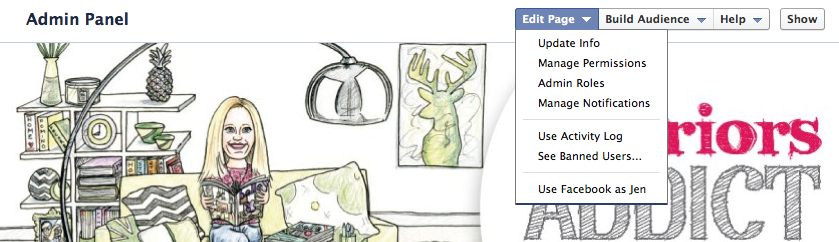
Then type what you want to appear on the front page, including your website address, into the box that says ‘Short Description’

Then hit ‘Save Changes’ and you’re done! You’re welcome 😉




Comments
I see this all the time as a customer and it URKS me so much haha! Thanks for spreading the message!
I always tell people thinking like a customer when you look at your own page/site is always a great first step 🙂
OMG – I knew that & am surprised when business pages don’t include their web address on the 1st page. Checked mine & I was guilty too!!! How could I? Thanks Jen, all recitified.
Some things are just too obvious, Mel! Glad you fixed! 🙂
Love this tip! Its impossible as a small business owner to be across everything so I love to see these simple ways to improve on what I’ve managed to set up. Thanks Jen.
I have done this on one of my pages but I can never work out why the Ethos Design one doesn’t have a short description. I have one entered in the box, but when you view the page you just see the location, phone number and opening hours. Totally stumped!
Could it be that it’s too long Anna?
Hi Anna, I had the same problem just now and it only showed up after I changed my category from Local Businesses (not sure why it was in that category), to Brands and Products. Hope that helps! Lauren
Maybe you’re onto something there Lauren! How odd! Facebook doesn’t make it easy sometimes!
I did that ages ago and it has increased click throughs. It actually annoys me when I go to a page and they don’t have a link 🙂
GUILTY! Thanks for writing a very informative and helpful blogpost. Really appreciate it. All better. 🙂 https://www.facebook.com/MidCenturyModernRemodel
Wow! I can’t believe I missed this step! Thanks for pointing it out!
Thanks for that tip. I had put all the info in the about section and I had put the website in he website section but so much better to put it in the short description as that is the only bit that shows up on the page. Done it. Very simple and a great tip. Thanks
That fixed it Lauren! Thanks for the tip 🙂
Hi there, I am having trouble putting my website address on my Facebook business page ‘Sarah’s House’ i I would love it in the box under Sarah’s house but can’t seem to do it, it just shows address!!! Ps you can access my fb page from my website to look if you like . Thankyou , Sarahx
Hi Sarah, someone else had the same problem and tried the below. Please see if it works for you?
Hi Anna, I had the same problem just now and it only showed up after I changed my category from Local Businesses (not sure why it was in that category), to Brands and Products. Hope that helps! Lauren
Thankyou – I followed your advice!!
Yay!! It worked, thankyou so much! Looks a lot more professional now. Sarah